Prescriptions overview
Prescriptions is where prescribers write, sign and send prescriptions, and where your team drafts them, sets reminders for repeats, and tracks each one until it's dispensed.
The Prescriptions page
Open Prescriptions from the sidebar. It opens on New prescription. With more than one location, the menu beside the title chooses where you're writing from.
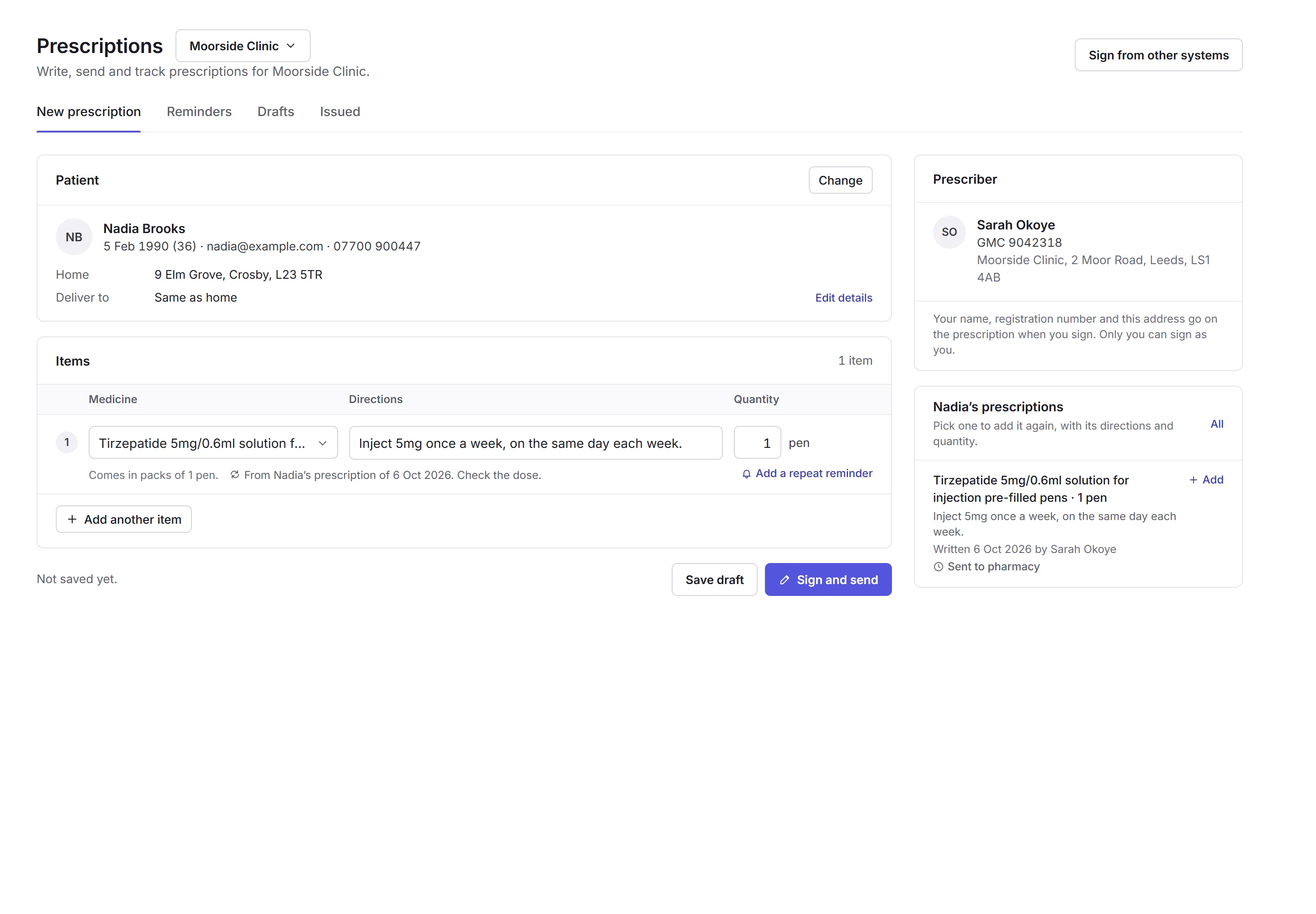
- The tabs
- New prescription, Reminders, Drafts and Issued. See The tabs.
- The patient
- Who it's for, their home, and where it's delivered. See The patient.
- An item
- The medicine, searched by name.
- Directions and quantity
- What goes on the label, and how many. Priorly suggests directions.
- Add another item
- A prescription can have several items.
- The prescriber
- Who signs it, with their registration number and the address that goes on it. Below, the patient's earlier prescriptions, each with Add to copy it in.
- Save draft and Sign and send
- Keep it for later, or sign it and send it. See Signing and sending.
The tabs
- New prescription
- Write one. See Writing and signing.
- Reminders
- Repeats that are Due now or Coming up, with Prescribe again. See Reminders.
- Drafts
- Prescriptions saved but not signed: yours, or All drafts.
- Issued
- Every prescription signed, with where it went and how it's getting on. See Issued prescriptions.
Who can do what
Anyone with the Prescriptions permission, and admins, can open Prescriptions, write drafts and set reminders. Only an active prescriber can sign. Someone who isn't a prescriber can save a draft for one: the prescriber finds it in Drafts.
To become a prescriber, choose Apply to be a prescriber at the foot of New prescription. You give your prescriber type, regulator and registration number, and Priorly checks them.
Tip: prescriptions for orders, approved and signed in quick view, are in Prescription orders. They show in Issued too.
In this section
Carry on with the detailed Prescriptions guides: