Subscriptions overview
A subscription starts when a customer chooses a subscription plan at checkout. Priorly then renews it on its own, making a new order each time, and Subscriptions shows them all: what renews when, and what needs your team.
Your subscriptions
Open Subscriptions from the sidebar. Click a name to open the subscription over the list. At a business with the Clinic tool, the list says Patient; anywhere else, Customer.
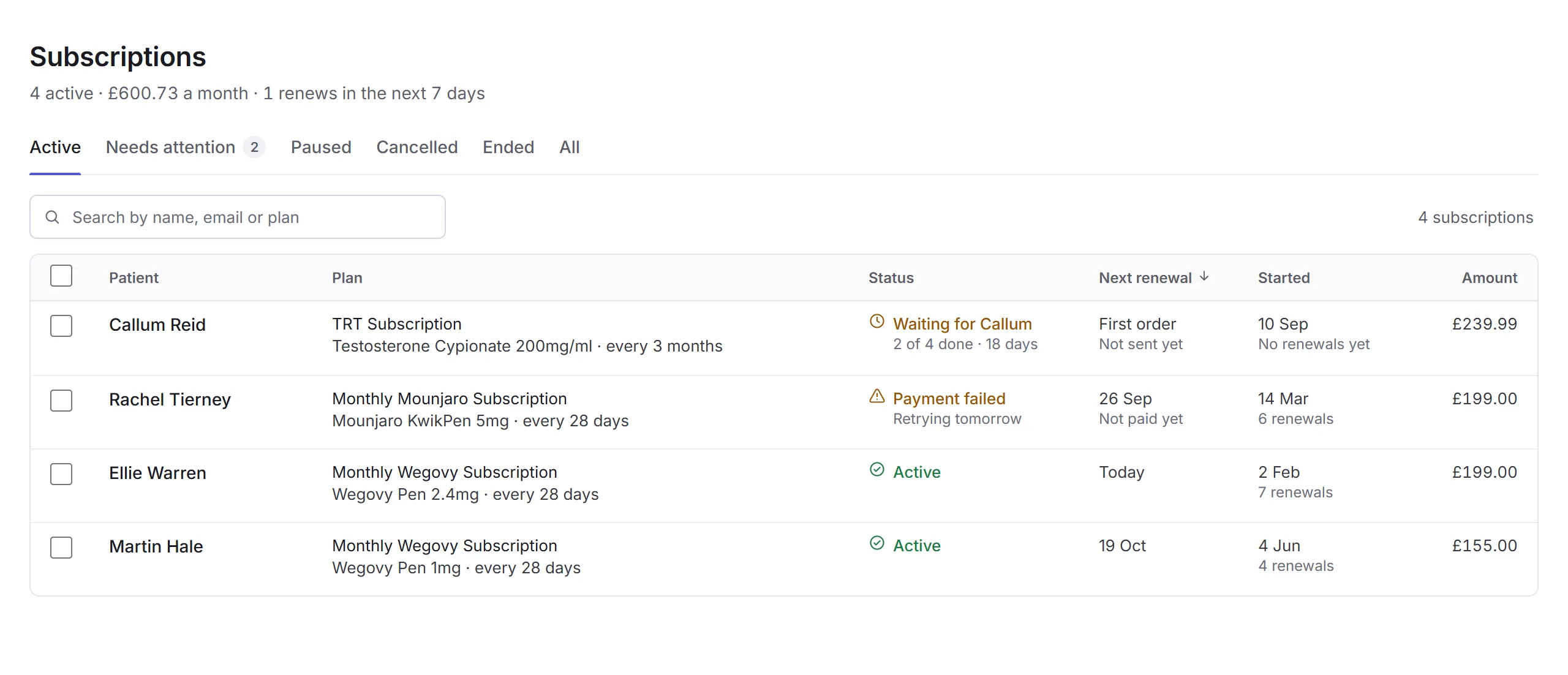
- The summary
- How many are active, what they bring in a month (with Business financials), and how many renew in the next 7 days.
- The tabs
- Active, Needs attention (with a count), Paused, Cancelled, Ended and All.
- Search
- Find one by name, email, plan or item. A pasted subscription ID searches every tab.
- A subscription
- Who, the plan with its item and how often it's sent, when it started and how many renewals there have been, and the renewal amount.
- Its status
- See Statuses.
- Next renewal
- When it renews next, soonest first, with first orders and anything overdue at the top.
Statuses
- Active
- It renews on the date shown.
- Waiting for
- The customer has tasks to do, like a check-in form, before the order can go ahead. It shows how many are done and for how long it's waited.
- First order with your team
- The first order is waiting for your team, like approval or sending.
- Payment failed
- A renewal's payment didn't go through. It shows when Priorly tries again. See Failed payments.
- Renewal overdue
- The renewal date has passed without a renewal.
- Paused
- No renewals until someone resumes it.
- Cancelled and Ended
- No more renewals, with the date it stopped. Your team can restart one.
Cancelling several
Tick active or paused subscriptions, click Cancel subscriptions, choose a Reason (only your team sees it), and confirm. There won't be any more renewals for them.
Seeing subscriptions needs the Manage subscriptions permission, for your own, your location's or all locations'. Business admins see them all.
In this section
Carry on with the detailed Subscriptions guides: