Coupons overview
A coupon is a code customers type at checkout, on a form or when they book, for money off, a percentage off or free shipping. Your team can also add one to an order or a booking.
Your coupons
Open Coupons from the sidebar. The tabs are Active, Scheduled (not started yet), Expired and All. Search by code or description.
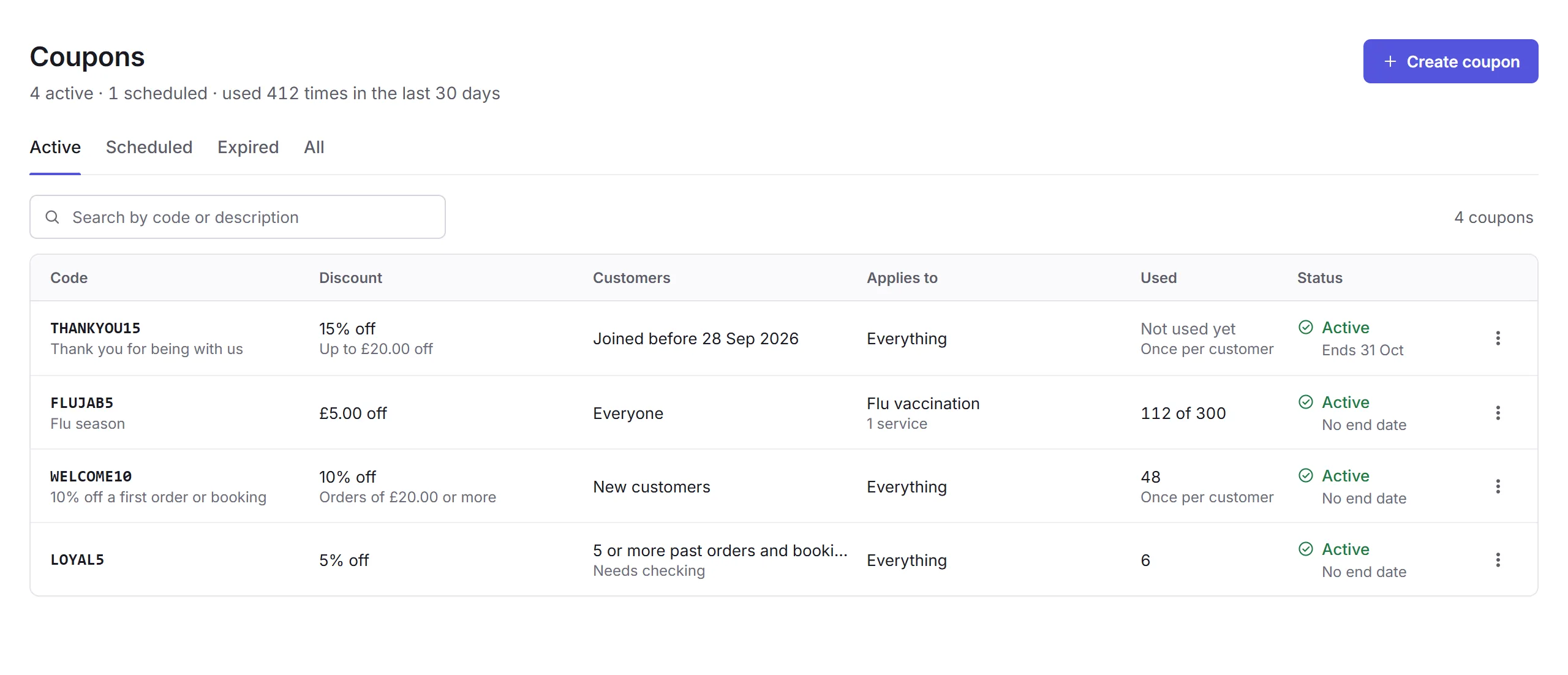
Each coupon shows its discount, who can use it, what it applies to, how often it's been used, and its status: Active, Scheduled, Expired or Used up. A coupon's menu has Copy code, Duplicate, End now, and Delete for one that's never been used.
Making a coupon
Create coupon
Click Create coupon.
Code and discount
Type a Code, or click Generate, and choose the Discount.
Who, how often, what and when
Everything else starts open: everyone, once per customer, everything, from now. Change what you need. See A coupon's page.
Create
Click Create coupon. If something needs fixing, Priorly lists it first.
End now stops a coupon working straight away; orders and bookings that used it keep their discount. Coupons are for admins and staff with Manage coupons; deleting one needs Delete coupons.
In this section
Carry on with the detailed Coupons guide: