Writing and signing
A prescription is a patient, one or more items, and the prescriber's signature. Write it in New prescription, then sign it with your PIN and send it to the pharmacy, or email it to the patient.
The patient
Search by name, email, date of birth or postcode, and choose them; New patient adds someone. If two records look alike, each is marked Possible duplicate, with the details that tell them apart.
Once chosen, the card shows their Home and where it's delivered: Same as home, or another address under Deliver to. Edit details corrects them, and Change picks someone else. Their name, date of birth and address have to be on the prescription before it can be signed, and the card says if any are missing.
Items
Medicine
Search medicines by name, brand or generic, and choose one. Controlled drugs in schedules 1 to 3 show, but can't be prescribed here: they need a controlled drug form.
Directions
What goes on the label, like "Take one tablet a day." Under it, Priorly offers Last time for this patient, and Olly suggests: click Use this to fill them in. Olly's suggestion is marked to check before you sign; Not right tells Olly what's wrong with it.
Quantity
How many, in the medicine's own unit, like pens or tablets. It says the pack size.
Add another item adds more. Add a repeat reminder, under an item, reminds your team to review it and issue the next supply on a date you choose: see Reminders.
Drafts
Save draft keeps it in Drafts to finish later. Someone who isn't a prescriber chooses who it's for under Draft for, and saves it: only prescribers can sign, and they find it in Drafts. Open a draft with Open draft, or delete it.
Signing and sending
Click Sign and send. If anything's missing, Priorly says what first. The dialog shows What you're signing, with each item's price where the pharmacy has one, then:
- Where it goes
- Send to the pharmacy: they dispense it and post it to the patient, and your clinic pays on account. Or Email it to the patient, who can take it to any pharmacy; nothing is charged through Priorly.
- Deliver to and Signed by
- Where it's going, and your name, registration number and address, as they'll be on it.
- Your prescribing PIN
- Type your 4-digit PIN every time here. After 5 wrong PINs, signing is locked for a while and you're emailed.
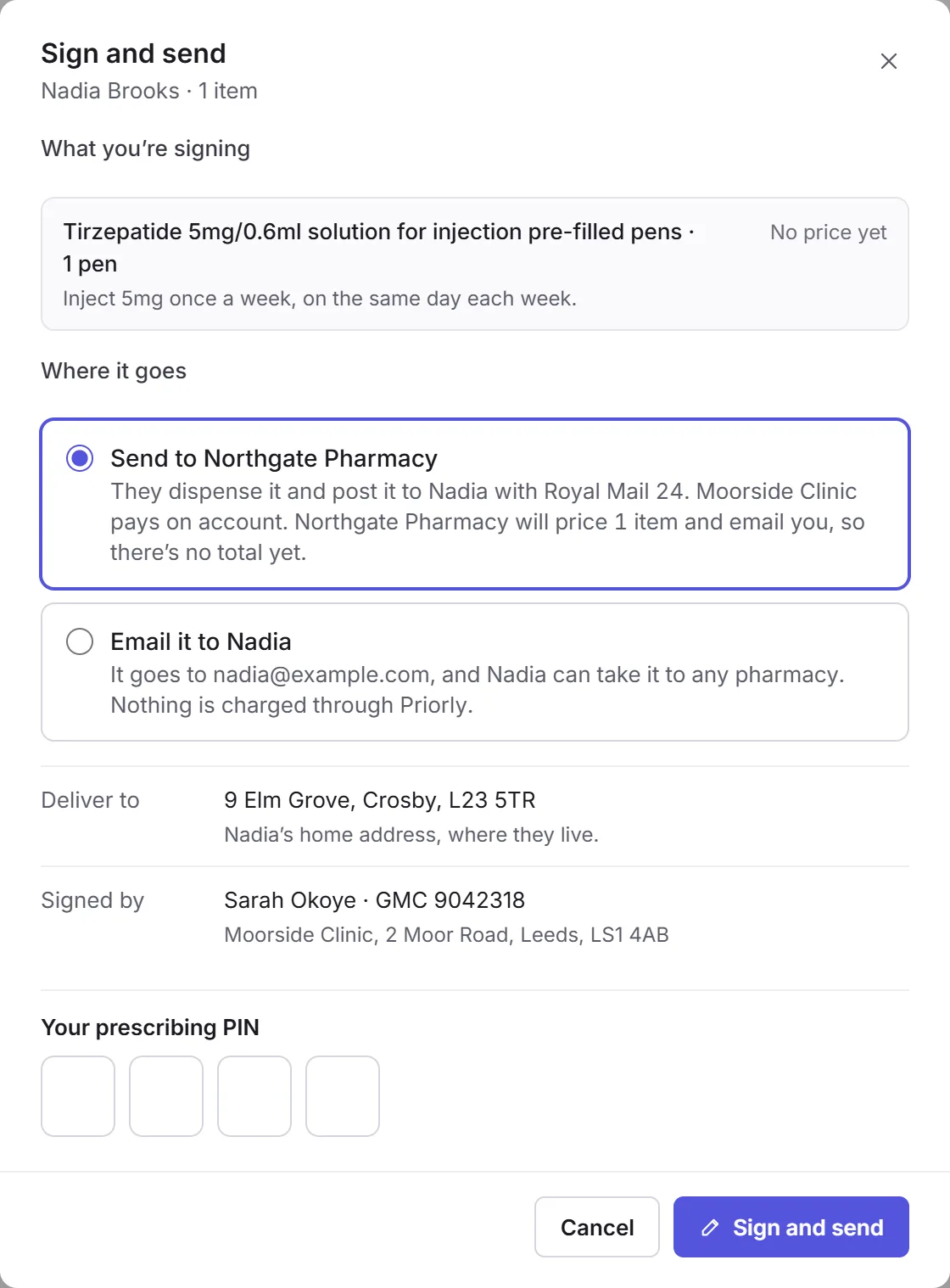
Click Sign and send (or Sign and email). The prescription's own page opens, and says it was signed and sent to the pharmacy as an order, or emailed to the patient. See Tracking and voiding.
Only you can sign as you. Never share your PIN, and never type it for someone else. If you don't have one yet, ask Priorly support.